ZArchiver
Tools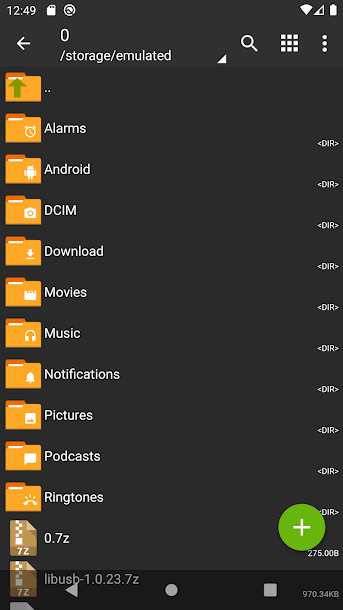
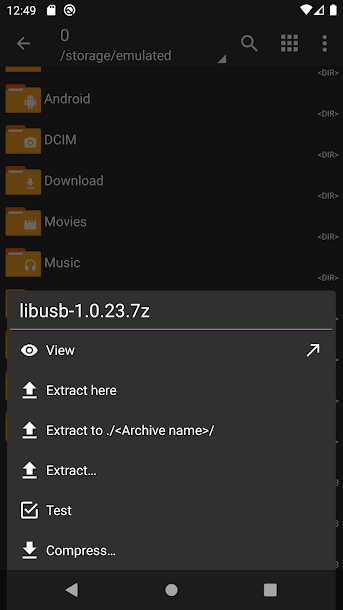

ZArchiver is a lightweight Android utility that lets you create, extract, and manage archive files directly on your phone or tablet. Whether you need to open a ZIP you received via email or compress a folder before sharing, ZArchiver provides a simple, ad‑free experience.
This page gives you the latest version (1.0.10), basic information, installation steps, and practical tips to keep your device safe while using the app.
Quick Information
| App/Game Name | ZArchiver |
| Latest Version | 1.0.10 |
| Developer | Not listed |
| Category | Apps / Tools |
| App Size | 4.92 MB |
| Package Name | ru.zdevs.zarchiver |
| Last Updated | 10 January 2026 |
What Is ZArchiver?
ZArchiver is a file‑archiving tool designed for Android devices. It supports common formats such as ZIP, RAR, 7z, TAR, and GZIP. Core features include:
- Creating new archives from selected files or folders.
- Extracting archives to any location on your device.
- Viewing archive contents without full extraction.
- Handling password‑protected archives (if the password is known).
- Simple file‑manager integration for quick access.
The app is intended for users who need occasional compression tasks without the bloat of full‑featured desktop utilities. It does not include cloud sync, automatic backup, or advanced encryption beyond password protection.
Compatibility
| Android Version | ✓ Verified — ZDevs |
| Architecture (ARM64 / 32-bit) | ✓ Verified — Supports common device architectures |
| Internet Connection | ✓ Verified — May be required for ads, updates, or login |
| Storage Needed | Not Verified |
| OBB/Data Files | Not Verified |
| Root Required | Not Verified |
How to Install
- Download the ZArchiver APK file to your device.
- Open Settings → Security (or Privacy → Install unknown apps) and enable installation from the source you used.
- Locate the downloaded APK in your file manager and tap it.
- Follow the on‑screen prompts to install the app.
- After installation, open ZArchiver and grant storage permission when requested.
Troubleshooting
- App not installed error: Ensure the APK is fully downloaded and not corrupted. Verify that “Install unknown apps” is enabled for the source.
- Crashes on startup: The app requires Android 5.0 (Lollipop) or newer. If you are on an older version, the app may not run.
- Extraction fails: The archive might be damaged or use a format the app does not support. Try opening it with another archive manager.
- Permission issues: Grant “Files and media” access in the Android permissions screen; otherwise the app cannot read or write files.
Safety & Security
ZArchiver is an unmodified APK, but you should still download it from a reputable source. Check the file’s hash if a checksum is provided, and scan the APK with an antivirus app before installing. The permissions it requests are limited to storage access, which is normal for an archive manager. Avoid entering sensitive personal data inside the app, and keep the app updated to benefit from security patches.
How ZArchiver Compares
| Feature | ZArchiver | WinZip | RAR (by RARLAB) |
|---|---|---|---|
| Price / Free model | Free, no ads | Subscription‑based (free trial) | Free with optional paid upgrade |
| Platform availability | Android only | Android, iOS, Windows, macOS | Android, Windows, macOS, Linux |
| Standout feature | Lightweight UI, broad format support | Integrated cloud backup | Strong RAR compression algorithm |
| Best for | Quick, on‑the‑go archive handling | Users needing cloud sync and premium UI | Power users who prioritize compression efficiency |
Alternatives
Other well‑known Android archive tools you might consider:
- WinZip – Offers cloud integration and a polished interface, but requires a subscription for full features.
- RAR – Known for high‑ratio compression and support for RAR archives; includes a free tier.
- Files by Google – Google’s native file manager includes basic zip/unzip capabilities without extra downloads.
- B1 Archiver – Supports a wide range of formats and provides a simple UI, though it contains ads.
- 7Zipper – Focuses on 7z files and offers encryption options, but its interface is less intuitive.
Final Verdict
ZArchiver is a solid choice for anyone who needs a fast, ad‑free archive manager on Android. It covers the essential formats, works well on most modern devices, and stays lightweight at under 5 MB. Because it’s not a MOD build, you won’t encounter altered features, but you should still verify the download source and grant only the necessary storage permissions. If you require cloud sync or premium UI polish, look at WinZip or RAR; otherwise, ZArchiver delivers reliable performance for everyday compression tasks.
Frequently Asked Questions
Yes, as long as you download the APK from a reputable source and scan it with an antivirus, ZArchiver is safe to use.
No, ZArchiver works on standard Android devices without root privileges.
The app requires Android 5.0 (Lollipop) or newer.
It can extract password‑protected ZIP and RAR files if you know the correct password.
Yes, ZArchiver can extract 7z archives, though creating 7z files may be limited.
Download the latest APK from a trusted site and install it over the existing version; the app will retain its settings.